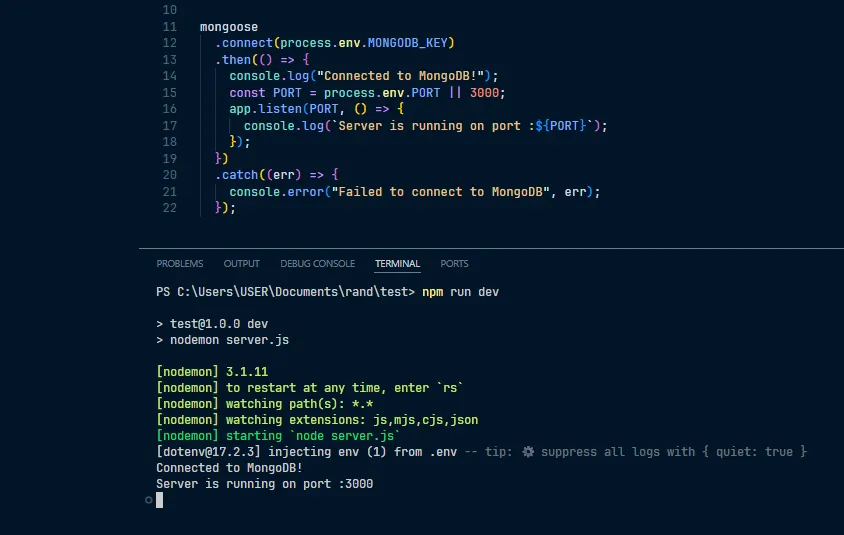
There is a higher chance your code is fine if you are trying to connect to MongoDB Atlas and it keeps hitting you with querySrv ECONNREFUSED.
Update (February 2, 2026): root cause found. Since publishing this, it has been discovered that this error specifically affects Node.js v22+ on Windows, caused by Node not correctly using the system DNS resolver.
If you are on this specific stack, there is a one-line code fix discovered by the community (credit to this StackOverflow question):
require("node:dns/promises").setServers(["1.1.1.1", "8.8.8.8"]);
However, if you are on an older Node version, or prefer not to hardcode DNS servers in your application code, the solution below (manually constructing the standard URI) remains the most robust way to bypass DNS issues entirely.
The problem
I encountered this error while trying to spin up my server and connect to my MongoDB database. The error is basically saying "your server is not failing to connect to the database; it is failing to connect to the DNS system to ask where the database is".
According to my research, this can be caused by DNS blocking, strict firewalls, or just a slow internet connection. Some blogs suggest whitelisting your IP address on MongoDB Atlas (I even tried whitelisting 0.0.0.0/0 out of desperation, please do not do this).
After surfing the internet for hours, the common suggestions were:
- Switch to a public DNS: change your DNS to Google (
8.8.8.8) or Cloudflare (1.1.1.1). - Flush your DNS: run this to clear your local DNS resolver cache.
ipconfig /flushdns # run cmd as administrator first
- Test to check if it has been resolved.
ping _mongodb._tcp.test.egxt9uu.mongodb.net
If after this it resolves back to an IP address, congrats!
Other things you can try: resetting your router (it might be an internet service provider issue), or double-checking your connection string.
Switching to the standard URI
The most reliable fix I found is switching back to the standard connection string. This is the one starting with mongodb:// instead of mongodb+srv://.
The problem is, the +srv connection string is recommended because it automatically handles failover and service discovery. Finding the standard URI requires a bit of technicality, as it appears to be completely hidden on the Atlas connection interface.
How to get the standard URI
To construct the standard string, we need to find the actual server addresses hidden behind that short +srv URL. We can do this using the terminal.
When your server crashes, you are probably getting an error like this:
Error: querySrv ECONNREFUSED _mongodb._tcp.test.egxt9uu.mongodb.net
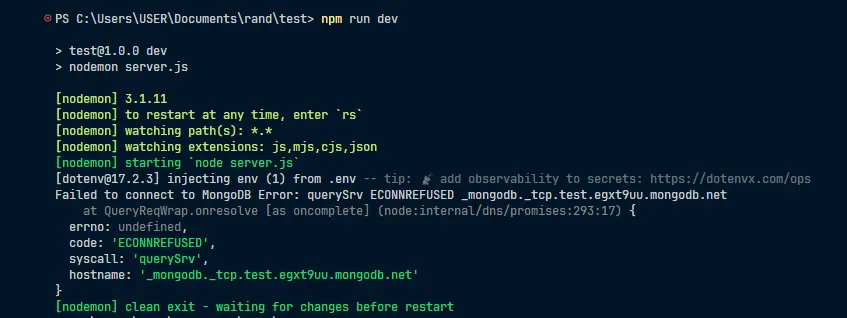
That hostname in the error message is exactly what we need. We are going to perform an nslookup with the SRV flag to ask the DNS server, "where is the database actually located?"
nslookup -type=SRV _mongodb._tcp.test.egxt9uu.mongodb.net
# replace the hostname with the one from your specific error message
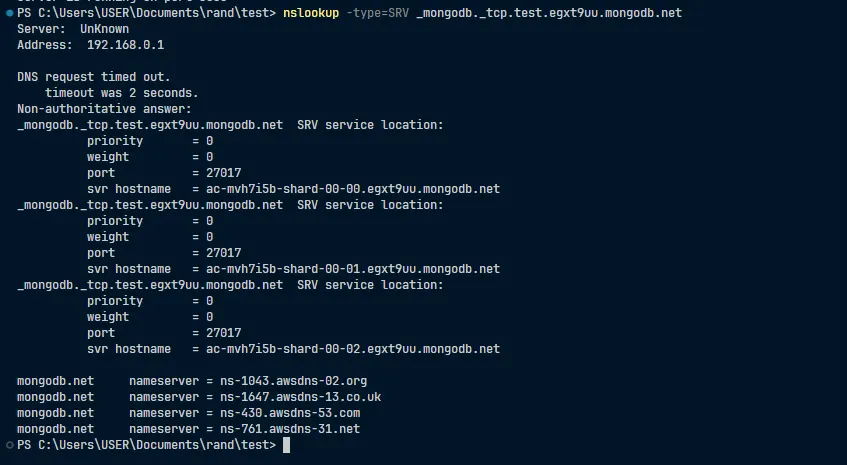
From the result we have literally gotten everything we need for our construction, everything the +srv string was hiding. There are 3 hidden servers, and now we have their real names (shard-00, 01, and 02) and their port (27017).
svr hostname = ac-mvh7i5b-shard-00-00.egxt9uu.mongodb.net
svr hostname = ac-mvh7i5b-shard-00-01.egxt9uu.mongodb.net
svr hostname = ac-mvh7i5b-shard-00-02.egxt9uu.mongodb.net
The construction
With those details, we can piece the connection string together manually.
- Protocol: change
mongodb+srv://tomongodb:// - Auth: add your credentials (
username:password@) - Host: list every server hostname we got from the
nslookup, separated by commas, and add the port (:27017) to each one. - Database: add the database name with a forward slash (e.g.
/test). - Options: append the standard options at the end:
?ssl=true&authSource=admin&retryWrites=true&w=majority
The skeleton
mongodb://USER:PASS@HOST1:PORT,HOST2:PORT,HOST3:PORT/DB_NAME?OPTIONS
The final result
mongodb://<username>:<password>@ac-mvh7i5b-shard-00-00.egxt9uu.mongodb.net:27017,ac-mvh7i5b-shard-00-01.egxt9uu.mongodb.net:27017,ac-mvh7i5b-shard-00-02.egxt9uu.mongodb.net:27017/test?ssl=true&authSource=admin&retryWrites=true&w=majority
And voilà! You should be able to successfully connect to your database without the DNS headaches. 🎉